

How to Fix Missing Software & Updates GUI in Ubuntu 26.04
If the Software & Updates graphical interface is missing in Ubuntu 26.04, you are not alone. On minimal, server, or custom Ubuntu installations, this essential utility is often omitted by default.
In this step-by-step guide, you will learn how to install Software & Updates in Ubuntu 26.04, how to launch the GUI from the terminal, and how to troubleshoot common repository issues.
What Is Software & Updates in Ubuntu?
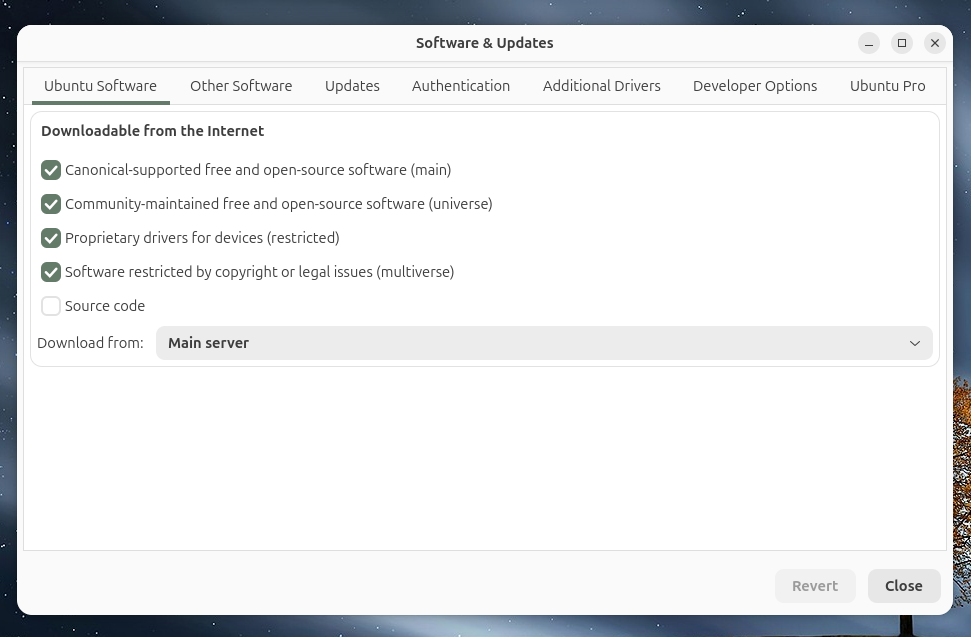
The Software & Updates application is the official graphical tool used to manage your operating system’s package sources. It allows users to:
- Manage Ubuntu software repositories (Main, Universe, Restricted, Multiverse)
- Enable, disable, or add PPAs (Personal Package Archives)
- Change download servers to improve update speeds
- Configure automatic security updates and driver settings
Technically, this graphical user interface is powered by the underlying Linux package known as software-properties-gtk.
How to Install Software & Updates in Ubuntu 26.04
If the tool is completely missing from your system, you can easily install it via the command-line interface. Follow these steps:
- Open your terminal (
Ctrl+Alt+T). - Update your local package index:Bash
sudo apt update - Install the missing desktop utility by running:
Bash
sudo apt install software-properties-gtk
This command downloads and installs the full graphical configuration tool along with all necessary dependencies required to manage your software sources safely.
How to Open Software & Updates GUI via Terminal
Once the installation is complete, you can open the application directly from your application menu or launch it instantly through the command line.
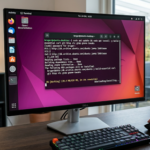
To open it from the terminal, execute the following command:
Bash
software-properties-gtk
The Software & Updates window will open immediately, allowing you to modify your system repositories, drivers, and update schedules.
Why Is Software & Updates Missing in Ubuntu 26.04?
There are several reasons why this repository manager might not be pre-installed on your system:
- Minimal Ubuntu Installation: The streamlined installer skips non-essential desktop tools to save disk space.
- Ubuntu Server Edition: Server environments lack a GUI by default, meaning
software-properties-gtkis excluded. - Custom Linux Builds: Certain cloud images or custom ISOs remove default components.
- Accidental Removal: The package may have been uninstalled during a system cleanup or dependency purge.
Troubleshooting: Software & Updates Not Opening
If you encounter issues where the application refuses to launch, try these troubleshooting steps:
1. Verify the Installation Path
Check if the system can locate the binary file by running:
Bash
which software-properties-gtk
If this returns no output, the package is not installed.
2. Force Reinstall the Package
If the app crashes or has corrupted files, perform a clean reinstallation:
Bash
sudo apt install --reinstall software-properties-gtk
Quick Reference Summary
| Task | Command / Detail |
| Package Name | software-properties-gtk |
| Installation Command | sudo apt install software-properties-gtk |
| Execution Command | software-properties-gtk |
| Primary Function | Manage Ubuntu software repositories & PPAs |
Fixing a missing Software & Updates tool in Ubuntu 26.04 is a quick process. By restoring software-properties-gtk, you regain full visual control over your system’s software sources and update preferences.
FAQ: Ubuntu 26.04 Software & Updates
Why can’t I find Software & Updates in Ubuntu 26.04?
It is usually missing because you chose the “Minimal Installation” option during the Ubuntu setup, or you are using a server edition that excludes graphical desktop utilities by default.
What is the package name for Software & Updates?
The official package name is software-properties-gtk. Installing this package via apt restores the missing graphical user interface.
Can I manage repositories without the GUI?
Yes. You can manually manage your software sources by editing the /etc/apt/sources.list file or checking the /etc/apt/sources.list.d/ directory using a text editor like Nano.
How do I fix Software & Updates if it crashes on launch?
Open your terminal and run sudo apt install --reinstall software-properties-gtk. This repairs any corrupted files or broken dependencies causing the crash.
See also How to Disable “System program problem detected” in Ubuntu (Permanent Fix)